
Facebook Ads Active but Not Spending? Here’s What to Check


You created your Facebook ad.
It says Active.
You come back an hour later.
$0.00 spent.
A few hours later?
Still almost nothing.
Before you duplicate the campaign, increase the budget or start changing random settings, there are a few things you should check.
Because Active doesn't necessarily mean your ad is actively being shown.
It simply means you've switched it on.
Your ad still needs to be eligible for delivery and compete for opportunities inside Meta's advertising system.
Here's how I would troubleshoot it.
Quick answer: Why is my Facebook ad active but not spending?
If your Facebook ad is active but not spending, check:
Let's go through them in order.
1. Don't just look at the green Active toggle
This is the first thing I'd check.
Facebook Ads Manager has three basic levels:
Campaign
↓
Ad Set
↓
Ad
Your campaign can appear Active while something underneath it has a different delivery status.
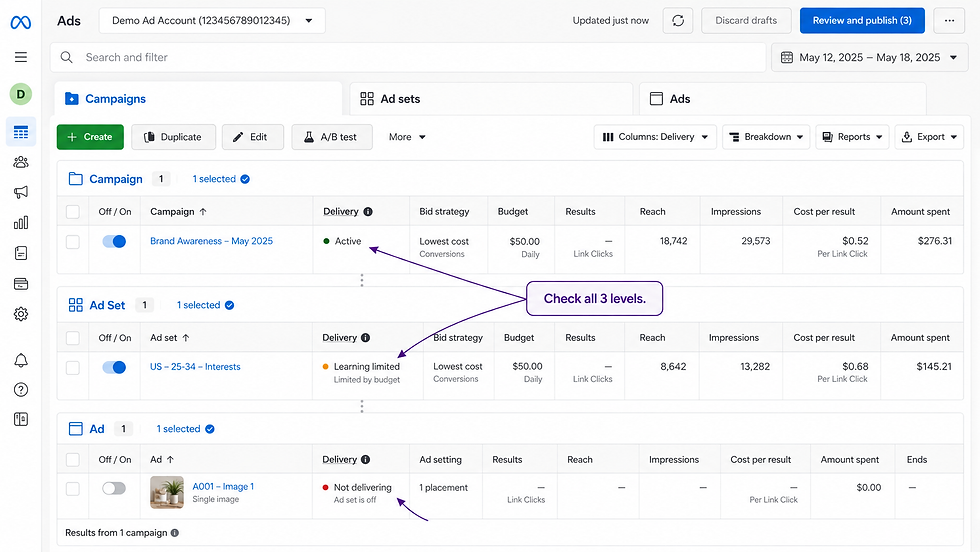
For example:
Campaign: Active
but:
Ad Set: Scheduled
or:
Ad: In Review
That campaign isn't going to spend normally yet.
Open Ads Manager and look specifically at the Delivery column.
Then check all three levels individually.
You might see statuses or warnings such as:
In Review
Scheduled
Learning
Learning Limited
Rejected
Error
Off
So don't stop at:
"But the button is green."
Find out what Meta is actually telling you about delivery.
2. Check your start date and schedule
This sounds ridiculously simple.
But I've seen campaigns that were completely fine except they hadn't actually started yet.
Open your ad set and check:
Start date
and, if you're using one:
End date
Also check the time.
If you've scheduled the campaign using a different timezone than the one you're thinking in, you can easily believe something should already be running when it isn't.
So before touching anything else:
Is this campaign actually supposed to be spending right now?
If not, you don't have a Facebook Ads problem.
You have a scheduling problem.
3. Your budget may be too restrictive
There isn't one magical minimum budget that works for every Facebook campaign.
A $10/day campaign can work.
So can $100/day.
So can considerably more.
The important question is whether the budget makes sense relative to the result you're asking Meta to generate.
Imagine you're trying to sell a $1,000 product.
Your normal cost to acquire a customer is $150.
And you've given Meta:
$3/day.
Technically, you can create the campaign.
But you've given the system very little room to find opportunities and generate enough data.
That doesn't mean:
"Always increase your budget."
It means:
Your budget needs to make sense for your objective and expected cost per result.
Meta currently recommends giving campaigns sufficient budget and duration to allow its delivery system to learn from performance rather than constantly running extremely short or constrained tests.
So look at your budget in context.
Ask:
What result am I optimizing for?
What does that result normally cost me?
Does this budget realistically give the campaign enough room to operate?
4. Your audience may be too restricted
Here's another common situation:
You target:
Malaysia
↓
one city
↓
age 35–42
↓
three interests
↓
one behaviour
↓
another interest
↓
multiple exclusions
And eventually Meta has almost nobody left to advertise to.
Advertisers often assume:
More specific = better targeting.
Not necessarily.
You're buying opportunities inside an auction.
If you give the system an extremely small pool of people to work with, you're also giving it fewer opportunities to deliver your ad.
Meta itself currently recommends broader audiences in many situations because larger audiences give its delivery system more opportunities to find people likely to respond.
So check the estimated audience size inside the ad set.
If you've added a lot of targeting conditions, ask yourself:
Do I genuinely need every one of them?
For many campaigns, simpler targeting can be more useful than trying to manually describe the perfect customer through 17 different settings.
5. Check your placements
Placements are simply the places across Meta's platforms where your ad can appear.
For example:
Facebook Feed
Instagram Feed
Stories
Reels
Messenger
other eligible placements
If you've manually restricted your campaign to only one or two placements, you're reducing the number of opportunities Meta has to deliver your ad.
That isn't automatically wrong.
There are situations where manual placements make sense.
But if your campaign is struggling to spend, it's one of the settings worth checking.
For most normal performance campaigns, I usually wouldn't restrict placements without a reason.
Meta currently recommends Advantage+ placements because giving its system access to more placements creates more opportunities to find efficient delivery. If choosing placements manually, Meta recommends using multiple placements rather than unnecessarily limiting distribution.
So ask:
Did I accidentally make delivery harder than it needs to be?
6. Check your bid strategy and cost controls
This one catches more advanced advertisers too.
You might have a perfectly good:
campaign
creative
audience
budget
but you've given Meta a cost constraint that is extremely difficult to achieve.
Imagine customers normally cost you:
RM50 to acquire.
Then you effectively tell the system:
Only get me customers if you can do it around RM10.
You may see very little delivery.
Why?
Because Meta can't simply invent auction opportunities that meet an unrealistic constraint.
This is why I'd be careful with bid caps and cost controls unless you understand why you're using them.
Sometimes removing an overly restrictive control gives the campaign enough freedom to actually compete and spend.
If you're a beginner and you don't know why you've selected a particular bid strategy, that's usually a sign to review it.
7. Did you just launch or significantly edit the campaign?
Not every campaign starts spending the second you press Publish.
And continually changing things because you're worried about the first few hours can make troubleshooting harder.
Meta's delivery system goes through a learning process where it explores which audiences and placements are more likely to produce the outcome you've asked for.
So if you:
launch → wait briefly → edit → wait → duplicate → change audience → change budget → edit again
you're making it very difficult to tell what was wrong in the first place.
Meta's current performance guidance specifically recommends simplifying account structure and minimizing unnecessary changes during learning.
So if everything else appears correct, consider whether the campaign simply needs some time to begin delivering.
That doesn't mean blindly leaving a broken campaign alone for days.
It means:
Don't create problems by trying to fix a campaign before you've identified a problem.
8. Check for billing, account and approval issues
Finally, zoom out from the campaign itself.
Your settings could be completely fine while there is an issue somewhere else in the account.
Check Ads Manager for notifications relating to:
payment problems
spending limits
account restrictions
rejected ads
verification requirements
policy issues
billing problems
Also check whether you've accidentally set an account spending limit.
If Meta isn't able to charge the account or your advertising access is restricted, changing the audience isn't going to solve anything.
Fix the account issue first.
A simple way to diagnose a Facebook ad that isn't spending

Instead of randomly changing settings, go through this order:
Step 1 — Delivery
Is the campaign, ad set and ad actually eligible to run?
↓
Step 2 — Schedule
Has the campaign started?
↓
Step 3 — Account
Are there billing, restriction or approval problems?
↓
Step 4 — Budget
Is there enough budget relative to the result you're asking for?
↓
Step 5 — Audience
Have you restricted targeting too much?
↓
Step 6 — Placements
Have you unnecessarily limited where the ad can appear?
↓
Step 7 — Bidding
Are your cost controls making it difficult for Meta to enter auctions?
↓
Step 8 — Time
Did you literally just launch it?
This process is much faster than changing five different settings and hoping one of them works.
What I wouldn't do immediately
If a new Facebook campaign isn't spending, I wouldn't immediately:
Duplicate it five times
You're creating more campaigns without knowing whether anything was wrong with the original.
Double the budget
A larger budget doesn't fix a rejected ad, wrong start date or billing issue.
Change the audience repeatedly
Again, diagnose first.
Rebuild the entire campaign
You may turn a very small problem into a completely new campaign you now need to troubleshoot.
Facebook Ads gets much easier when you stop treating every problem like an emergency.
Look at the data.
Find the constraint.
Fix that constraint.
Then see what happens.
Active and spending slowly are also different problems
There is another important distinction.
Scenario A
Budget: $50/day
Spend after an entire day: $0
Something may genuinely be preventing delivery.
Scenario B
Budget: $50/day
Spend after 45 minutes: $2.37
Your campaign is spending.
It's simply not spending at the pace you expected.
Daily budgets on Meta are not necessarily spent at an identical rate every hour.
Meta describes a daily budget as the average amount you're willing to spend each day, and delivery can fluctuate as its system looks for advertising opportunities.
So don't confuse:
not spending
with:
not spending quickly enough for me.
Those require different decisions.
What if everything looks correct but it still isn't spending?
If you've checked:
✓ Delivery
✓ Dates
✓ Billing
✓ Budget
✓ Audience
✓ Placements
✓ Bidding
and the campaign still isn't receiving meaningful delivery, I'd look more closely at the overall setup rather than randomly changing individual settings.
Meta's ad auction evaluates multiple inputs together—including your objective, budget, audience and creative.
A campaign isn't just:
ON = spend money
There still needs to be an opportunity for Meta to show the ad.
And that's why learning how the system works is much more useful than memorising where every button is.
Learn Facebook Ads without guessing
If this sounds familiar —
launch campaign → something looks wrong → Google the problem → change a setting → new problem →Google again —
that's exactly what SellToStrangers™ Facebook Ads Mastery is designed to fix.
The goal isn't just to teach you which buttons to press.
It's to help you understand:
how campaigns are structured
how Meta delivers ads
what metrics actually matter
how to diagnose problems
when to change something
and when to leave it alone
The complete course is currently $49.

Frequently Asked Questions
Why is my Facebook ad active but spending $0?
An Active status means the campaign is switched on, but other factors can still prevent delivery. Check the Delivery column at the campaign, ad set and ad levels, followed by your schedule, payment/account status, audience, budget, placements and bidding settings.
How long does it take a Facebook ad to start spending?
There is no guaranteed number of minutes. A newly published ad may need to complete review and begin entering eligible auctions before delivery becomes visible. Check its actual Delivery status before assuming something is broken.
Can my Facebook audience be too small?
Yes. Very restrictive targeting can reduce the number of opportunities available for delivery. If you've layered many interests, demographics and exclusions together, consider whether each restriction is actually necessary.
Should I increase my Facebook Ads budget if the campaign isn't spending?
Not automatically. First identify the reason for poor delivery. Increasing budget will not solve problems such as an ad still being reviewed, an incorrect schedule, billing issues or overly restrictive bidding.
Why is Facebook only spending part of my daily budget?
Daily budgets are averages rather than a promise that the exact amount will be spent evenly throughout each hour. Actual delivery depends on available auction opportunities and your campaign settings.


Comments